faith, queer, resources

Queer Christian History

We have a long, complicated history as a queer Christian community. It’s crucial that we preserve, learn, and grow from that history with each generation that follows so we know who we are, that we are not a new trend, and that “tradition” is in the eye of the historian. We are proud to have a deep, rich history of faithful love and justice work, standing strong in our God-given identities. LGBTQIA+ Christians have always been here. Our stories were just erased. Make the invisible visible again in remembering them:

The LGBTQ+ Religious Archives Network

The LGBTQ Religious Archives Network (LGBTQ-RAN) is an innovative venture in preserving history and encouraging scholarly study of lesbian, gay, bisexual, transgender and queer (LGBTQ) religious movements around the world. LGBTQ-RAN has a two-fold basic purpose.

Second, LGBTQ-RAN provides an electronic information clearinghouse for these archival collections and other historical data about LGBTQ religious history for the use of historians, researchers and other interested persons.

First, it assists LGBTQ religious leaders and groups in determining how best to preserve their records and papers in appropriate repositories.

Center for LGBTQ and Gender Studies in Religion

The Center for LGBTQ and Gender Studies in Religion (CLGS) was established at Pacific School of Religion in Berkeley, California and opened its doors in the fall of 2000.

Whosoever Magazine

Since 1996, Whosoever has existed to publish resources, primarily in the form of curated content, for those who seek a deeper understanding of the truly loving God, whose unconditional love is experienced as boundless grace.

Queer Saints Project

The Queer Saints Project began as a collaboration between the artist, Jason Tseng, and Judson Memorial Church, a historic church located in New York City’s West Village neighborhood. In 2018, Judson commissioned Tseng to create icons of LGBTQIA+ ancestors, to celebrate their inherent divinity, honor their contributions, and reclaim them as queer saints. The goal is to raise awareness and funds for the LGBTQIA+ community using these transcendent images that glorify and celebrate the miracle that is queerness.

The LGBTQ History Project

QSpirit: LGBTQ Saints, Queer Saints

Kittredge Cherry provides profiles and a saints day calendar that ask “What if” in queering the Bible and Christian history, as well as recognizing modern-day and historical queer people of faith in ways the church has largely ignored. Dare to imagine, explore, question, and enjoy beyond the normative and cisheteropatriarchical-assumed stories we’ve been taught.

Making Gay History: Rev. Carolyn Mobley-Bowie

Growing up in the segregated South, Rev. Carolyn Mobley-Bowie knew the challenge of finding an accepting place in the world—a challenge that only grew when her attraction to women came into conflict with her devotion to God. The predominantly gay Metropolitan Community Church offered refuge.

OutHistory: Religion and Homosexuality in the United States, by John D’Emilio and His Students

An essay by historian John D’Emilio “On Teaching Religion and Homosexuality in the U.S.,” and six chronologies on religion and homosexuality in the United States. First published on OutHistory in 2014.

Associated Press: A brief and incomplete, but helpful, overview of mainline denominations’ shifts on LGBTQIA+ inclusion in ordination, leadership, and marriage.

This timeline highlights key milestones and flashpoints within the UMC, Presbyterian Church (U.S.A.), Episcopal Church, Evangelical Lutheran Church in America, United Church of Christ, as well as in civic life.

By affirming denomination

Your experience may vary, but overall, these denominations have come to a broadly LGBTQIA+ affirming stance and hold socially progressive theology.

Metropolitan Community Church

When We All Get to Heaven

When We All Get to Heaven is a documentary project that tells the story of one of the first gay-positive churches, the Metropolitan Community Church of San Francisco, and how it faced the personal, social, and political trials of the AIDS epidemic, including the deaths of 500 of its members.

The Classical Ideas Podcast: EP 197: We Who Must Die Demand a Miracle and MCC San Francisco w/Dr. Lynne Gerber

Dr. Lynne Gerber (she/her/hers) is an independent scholar. She is the author of Seeking the Straight and Narrow: Weight Loss and Sexual-Reorientation in Evangelical America (Chicago, 2011). She is currently working on a history of religion and HIV/AIDS in San Francisco.

Queercore podcast: The Radical Priest: Rev Troy Perry (Season 4; Ep 8)

He’s preaching revolution! In this episode, Reverend Troy Perry, founder of the Metropolitan Community Church, joins us to chart his unlikely journey from Southern Baptist roots to gay‐affirming ministry and queer liberation. He recalls founding MCC in his living room in 1968, officiating groundbreaking same-sex marriages, and fighting for dignity when society told him faith and queerness could never co-exist.

There were fires—literal and metaphorical—that threatened his church, courtroom battles, and protests in the street. Through it all, he held onto something radical: that God loves us all, fully and without apology. Tune in to witness faith as resistance and prophecy as sanctuary.

United Methodist LGBTQIA+ History

Affirmation was founded in 1972 and went on to establish Reconciling Ministries. Affirmation was the first group to include Transgender people and was the first to provide direct support to LGBTQ+ people in Uganda and Kenya.

As the Church embraces a more inclusive and hopeful future, the Center exists to intentionally collect, preserve, and share the stories of Queer individuals whose voices, ministries, and faith have long been marginalized. Through this work, the LGBTQ+ UMC Heritage Board is tasked with ensuring LGBTQ+ people and their legacy in the Church can move forward unapologetically to be seen, celebrated, and empowered in the fullness of who they are.

Dedicated page for profiles of notable clergy and lay people, oral histories, online exhibits, and digital archive collections from the UMC.

Episcopal LGBTQIA+ History

  • TransEpiscopal – TransEpiscopal is a group of transgender, nonbinary, and allied Episcopalians dedicated to fostering the full embrace of trans and nonbinary people, and our loved ones within the Episcopal Church and to inspiring faith-based advocacy for trans and nonbinary justice in the wider world.
  • LGBTQIA+ Episcopal History – Faithful Episcopalians have been working toward a greater understanding and radical inclusion of all of God’s children for nearly a half-century.

United Church of Christ LGBTQIA+ History

  • Open and Affirming Coalition – Beginning in 1969, the United Church of Christ has advocated for the LGBT community. From the campaign to decriminalize same-sex relationships to support for marriage equality, the UCC has made a difference in the lives of LGBT citizens and their families. The issues have changed over the decades, but the basic commitment to full inclusion and human rights remains the same.

Presbyterian Church USA LGBTQIA+ History

  • Timeline of LGBTQIA+ History – The Presbyterian Historical Society has created a timeline of LGBTQIA+ related history in the Presbyterian Church (U.S.A.). The stories included show how church members’ perspectives as well as the language used to speak about sexuality shifted throughout decades of advocacy work by LGBTQIA+ Presbyterians and allies.

ELCA (Lutheran) LGBTQIA+ History

Brethren and Mennonite Council LGBTQIA+ History

  • Oral history project at the Center for Queer Studies – Amy Short, in her work on the BMC Elder History Project, has been busy collecting stories, primarily from older BMC individuals, but also from some younger ones as well. Currently she has over 40 hours of taped interviews that will be preserved for their archives, with some utilized for trainings or simply shared as a celebration of their strength and variety as a community.
  • “Repent of the Sins of Homophobia”: The Rise of Queer Mennonite Leaders by Rachel Waltner Goossen

United Church of Canada

Quakers in Britain

Other notable groups in LGBTQIA+ Christian History:


Many more to come! If you have more queer Christian history/archival sites to suggest, please submit them via DMs on Bsky, Threads, Instagram, Substack, Discord, or Facebook (all under @ jennadewitt), or send me an email at jennadewitt (at) gmail (dot) com.

disability, faith, Mental health, neurodivergence, resources

Progressive Christianity and neurodivergence

Justin, Ell, and I hosted a gathering for neurodivergent progressive Christians for Disability Pride Month 2025. Though this year’s event was not specifically for asexual and aromantic people, there is significant overlap with these communities, which was reflected in this discussion. (See our previous conversations about the a-spec Christian intersection here.)  

Discussion questions:

  1. How has your neurodivergence affected your experience of Christianity? 
  1. How has your faith affected your experience of being neurodivergent?
  1. How have you been supported by your community?
  1. What challenges have you encountered in your communities?
  1. How can the Christian community as a whole better support and uplift neurodivergent people? What can Christianity learn from neurodivergent people and their lived experience?
  1. What encouragement/words of affirmation can you share with other neurodivergent Christians?
  2. What spiritual practices, resources or supports have helped you with your neurodivergence and faith?

allyship, aromanticism, asexuality, queer, resources

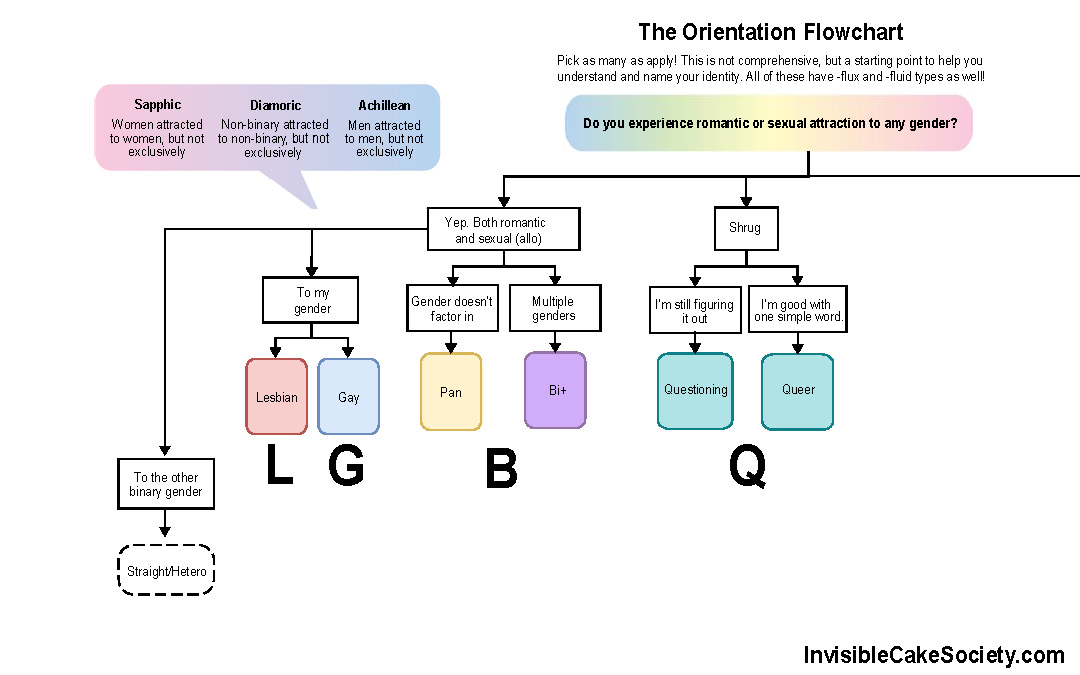
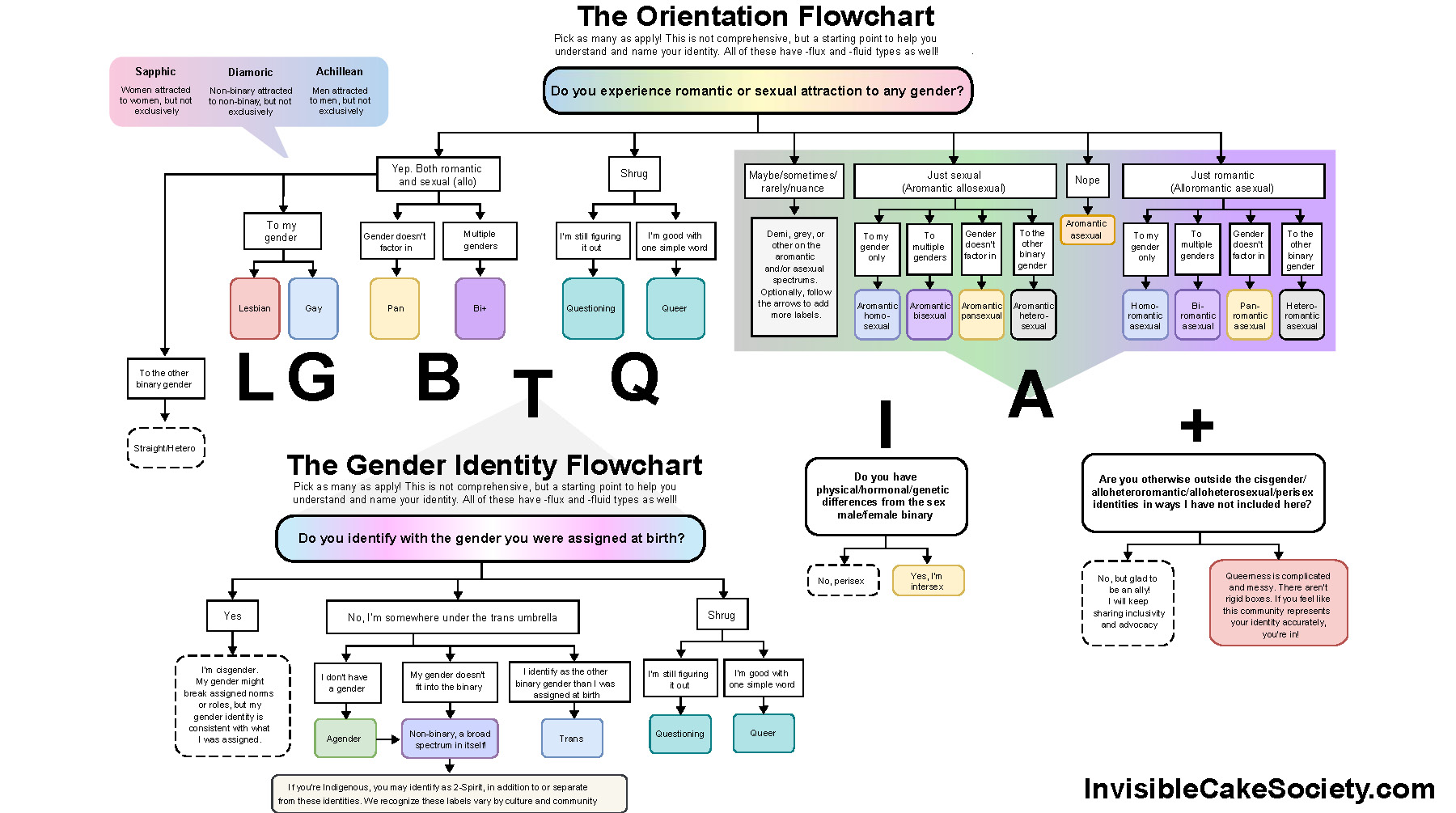
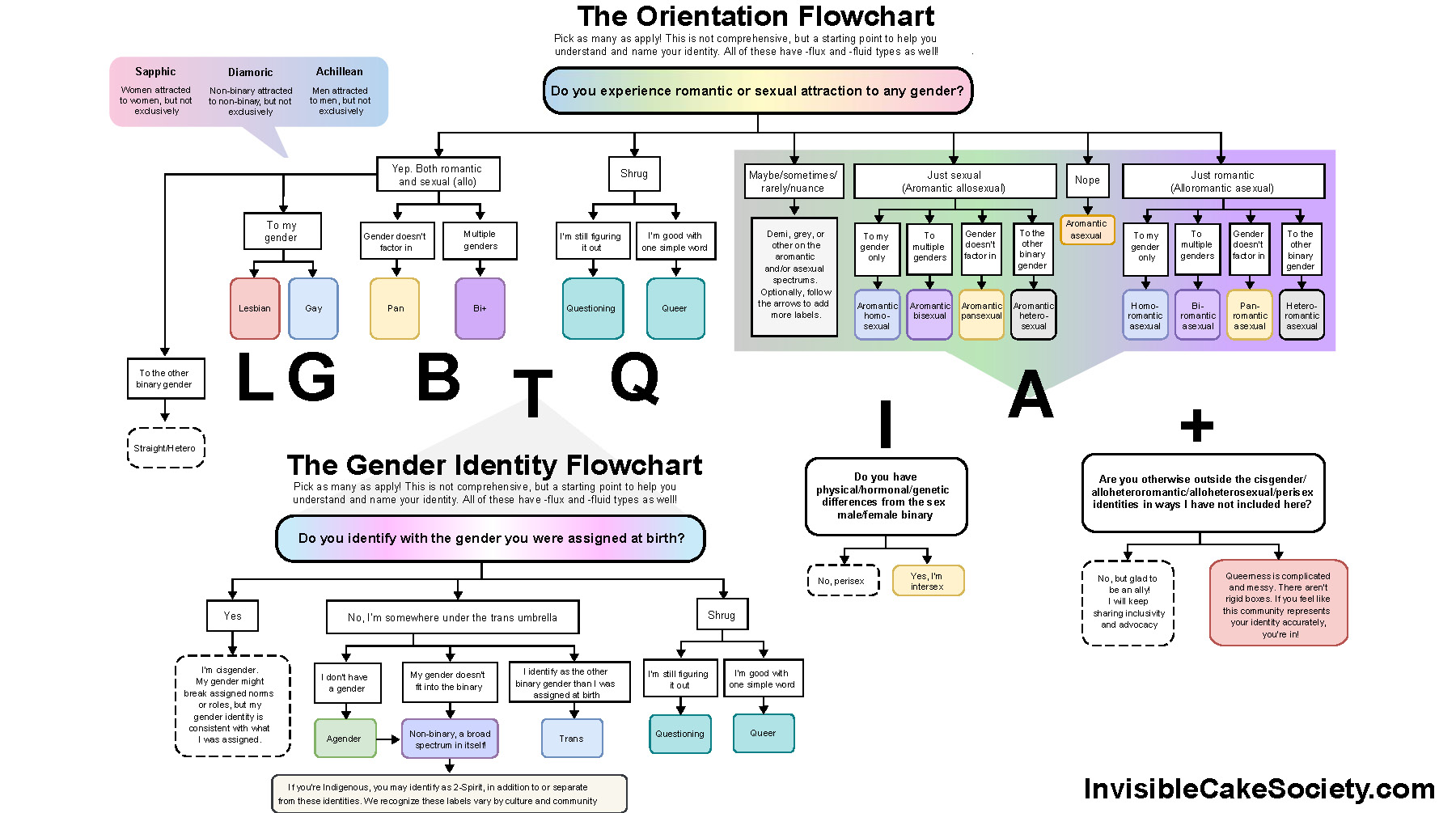
The Queer Identities Flowchart

  • LGBTQIA overview
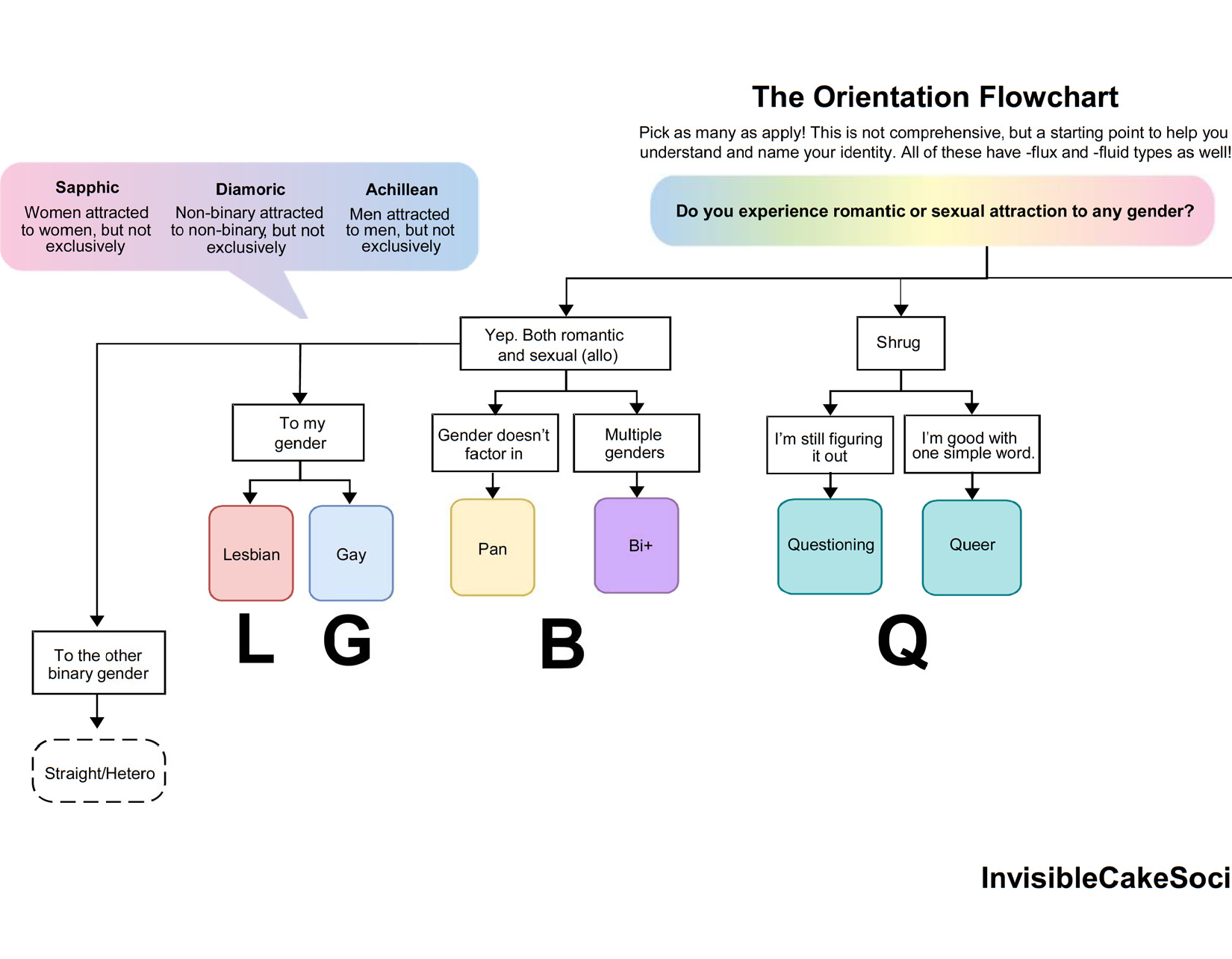
  • L G B and Q
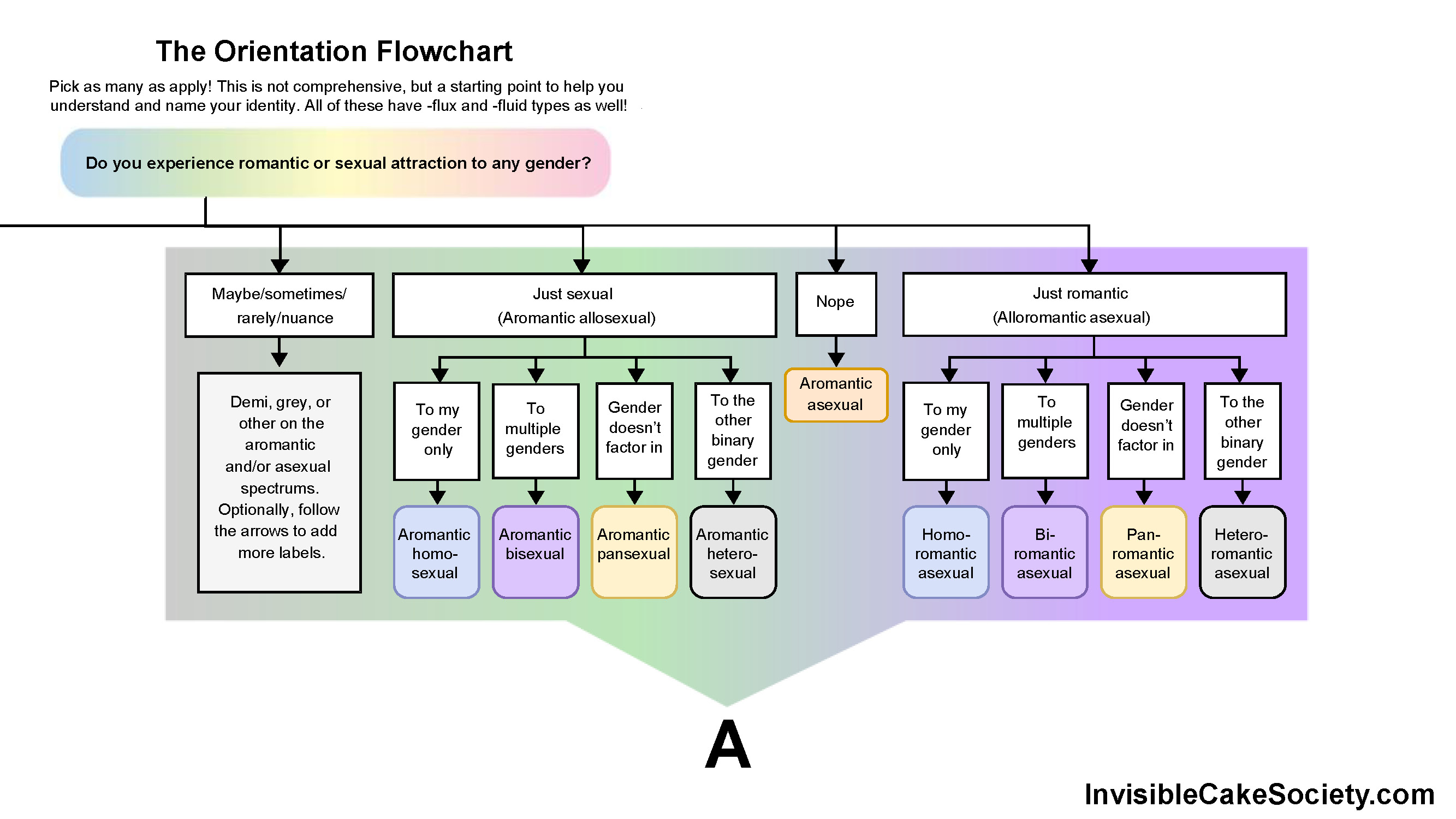
  • A spectrum
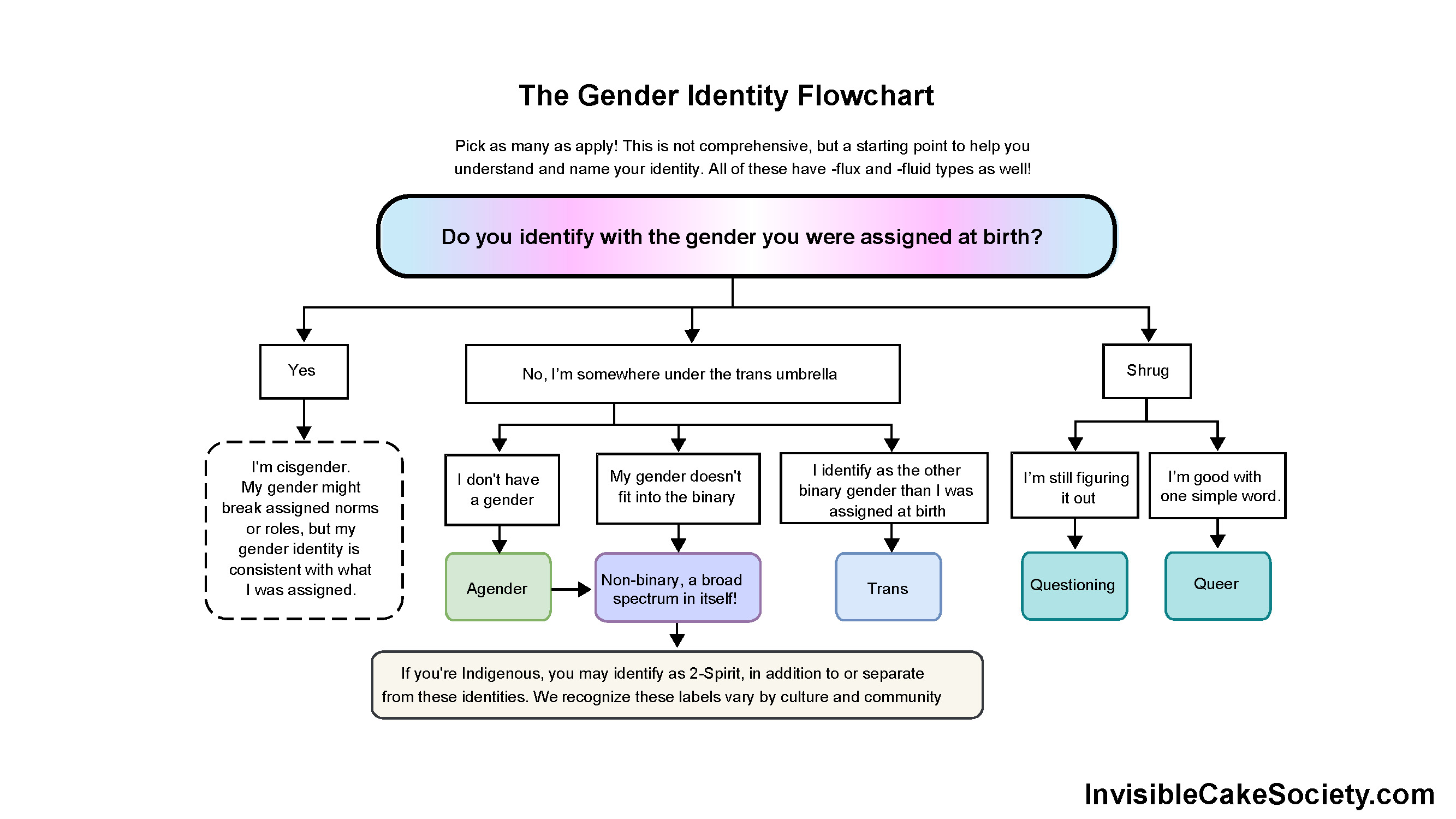
  • Gender spectrum
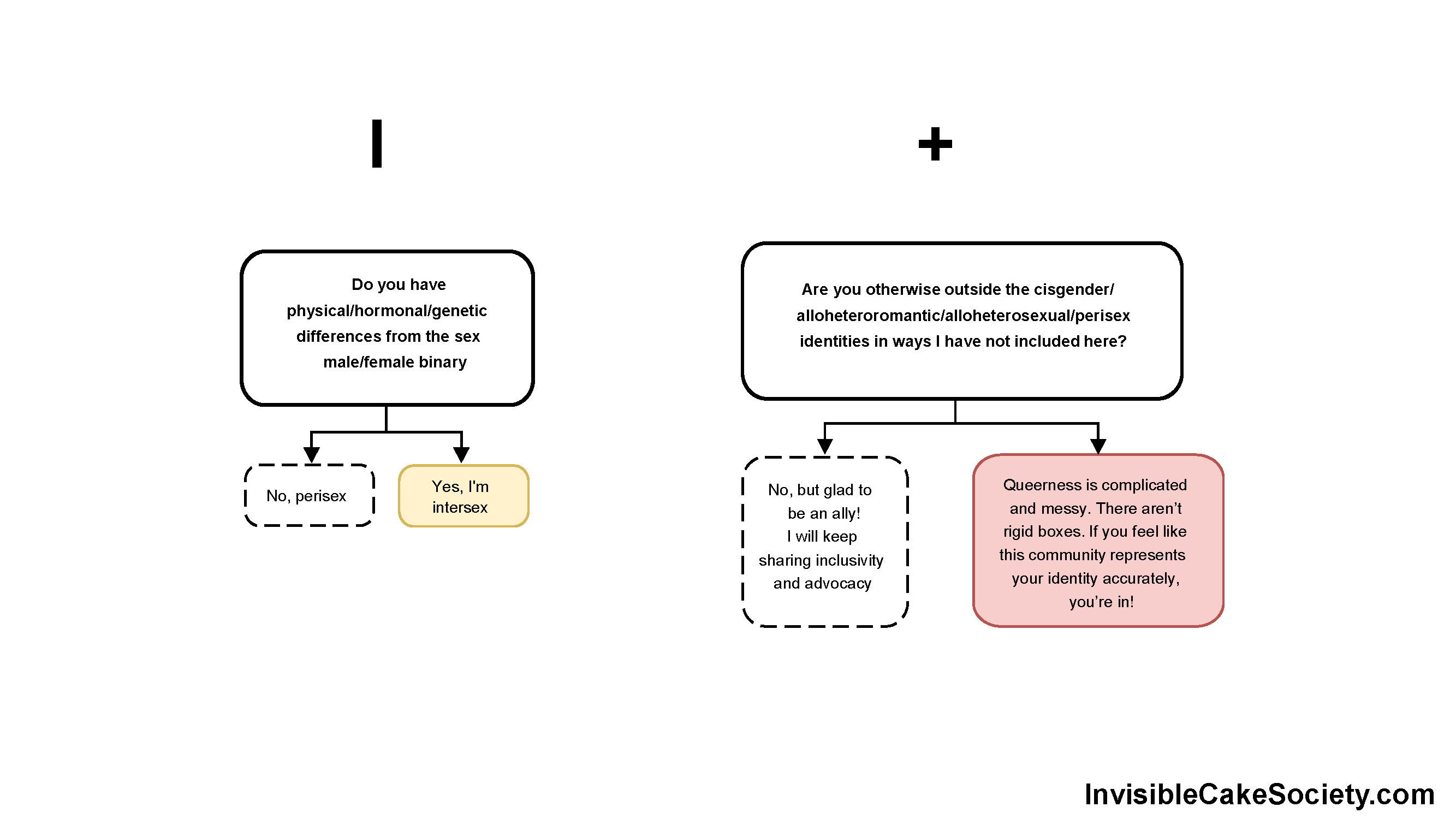
  • Intersex and plus

I’m hoping this flowchart can help everyone understand that the letters aren’t just a jumble of alphabet soup, but there is an organized system behind each one. It’s easier to see if you click the arrows to navigate through each slide, focusing on a specific section. These concepts are pretty much a multiple-choice test.

Orientation options include:

  • Attracted to the other binary gender
  • Attracted to my gender
  • Gender isn’t a factor
  • Attracted to multiple genders
  • Don’t know/don’t need to specify
  • Rarely or in certain situations
  • Just sexual
  • Just romantic
  • None of the above

Gender options include:

  • Same as the one everyone expected when I was born (“assigned at birth”)
  • No gender
  • Fluid or more than one gender or a gender not in the binary
  • The other binary gender of the one everyone expected when I was born

Intersex identities and other variations of queerness are also included.

Open these in a new tab or zoom in to explore!

LGBTQIA overview
A spectrum
Gender spectrum
Intersex and plus

Hope these are helpful! This is meant to be the start of the conversation, not the end point. Explore more in-depth and specific identities here: https://lgbtqia.wiki/wiki/LGBTQIA%2B_Wiki:FAQ

pop culture, resources, the society

Simplify BlueSky: Tips and Tricks for an Easy Migration

Many of us represented here in the Invisible Cake Society—a feminist, queer/ally, often asexual/aromantic, progressive Christian, neurodivergence, mental illness, and disability site—have found ourselves curious about BlueSky. Whether you’re migrating from Twitter (“X”) or a Meta platform (FB, Insta, Threads), or simply want to see what the hype is about, this guide can walk you through the basics.

BlueSky’s culture, purpose, and design combine an older model of social media and the forefront of a new liberated era: It actually shows you what you signed up to see. Imagine that. Groundbreaking.No ads, no gaming the algorithm, no being spoon-fed whatever the app wants you to see while posts from friends are suppressed, and no disappointment when you see a post about an “upcoming” event show up on your feed for the first time, only to discover that the event happened several days ago. It’s real time here and you have much more control over seeing what you want to than on any other app. More on that later.

I’ve tried to make this as basic and easy as possible, but if you’re really just looking for the bare bones top 10 tips, go here: https://bsky.app/profile/joabaldwin.com/post/3lc4nlhpjds2y

BlueSky works on something called the fediverse. All you need to know right now about that is user handles are longer here and vary, but most end in .social. It’s like .com or .org, sort of. If you want to know more, there are plenty of good explainers out there, but you’re reading my simple start guide so you probably don’t need to care at the moment. Let’s go!

Before we begin, open the homepage, Bsky.app on a desktop browser. Most of this is easier on a desktop browser. A desktop browser is required for step 4’s browser extension. At this time, no app version or mobile browser version of this extension exists.

Also: If any of this changes or is wrong, please let me know and I will edit this guide!

Create an account and personalize your profile

  1. Pick a username (handle), upload a photo and banner, write a bio/description in the text box of how people might know you and what you post about, etc etc… you know the drill.
    1. I’d highly recommend, if you need to be recognizable, whether as an activist, leader, internet educator, a brand, or business (including writer or freelancer), go professional: real name or brand name, good portrait photo of your face or good-quality logo, website link, and a description that matches other social media and your website and clearly states what you do that might help people recognize you from elsewhere or find you for the first time and want to follow.

    1. If you have an established internet pen name and want to continue to post under that, use that as your username and try to keep your photo, banner, and/or description similar to the platforms you’ve been using already, at least at first.
    1. If you want to stay anonymous and create a new name/personal brand here, this is a great time to do it, but stay aware that everything on BlueSky (at least at this time) is public. There are no private accounts (yet?).
  2. Explore the settings for each part of the site.
    1. The gear button on the left sidebar on desktop only takes you to some of the settings (https://bsky.app/settings), but you can change your profile appearance, who can send you direct messages, how and which of your feeds (the tabs on the top of the home page) display, etc. by clicking each respective icons in that left side bar and then a button at the top right.

    1. Don’t get distracted by each empty section of the site so far or terms you don’t know yet. We’ll come back to this.

    1. First, take some time to open each section of the Settings and set the things you know you want/need, like privacy, nsfw settings, muted words, font size, default language, etc.
    1. You can also read the official BlueSky FAQs to get a quick overview of what terms mean, who can see what, and links to download the mobile app. Again, if you don’t know what something is yet, don’t worry about it. There’s a broad range of users on this app, from complete beginners to the expert internet-coding pioneers shaping the future, so treat it like a group exercise class and go at your own pace while letting the elite Pilates/yogi/Zumba athletes go at theirs.

Post and find posts

  1. Before you follow anyone, post something so people know it’s the real you. Link to your site, do an intro post with facts about you, copy and paste your most timeless and relevant post from elsewhere, or simply start posting you usual content here instead of/in addition to other social media apps. Post whatever first impression you want to give so people know immediately who you are and what vibe you’re going for here.
  2. Now, add some feeds (tabs on the top of the home screen) besides the default. Feeds are automated tools, not hand-curated lists (those are up next). They might be automatically customized for your account specifically or populate based on a hashtag, emoji, keyword, or other trigger. Some allow anyone to add a post by using the hashtag or emoji, while some require being added by the creator as a contributor. Look through the following linked post for any that appeal to you (the Mutuals one is my favorite—only posts from people I’m following who are also following me). Once you’re on the feed’s page, pin it to the Home page so you don’t have to save the URL somewhere. (Though you could! You do you.) https://bsky.app/profile/erinbiba.bsky.social/post/3lbxbqv65722h
    1. Find more! https://bsky.app/feeds, accessed by clicking the # button on the left side bar, not only allows you to view feeds (and lists saved as feeds) you have pinned but also search for more and see popular suggestions.
  3. Next, create some lists of accounts you will want to see.
    1. You can save these as if they are feeds (tabs on the top of the home screen). This allows you to organize accounts into topics or to keep your default feed to just the people you follow, who you really want to see first thing when you open the app. Using lists, you don’t have to follow accounts that you don’t want in your default feed but do still want to have readily accessible. This allows you intentional organization and sanity-preserving separation from, for example, news and politics. And vice versa, if you need a break, you can create a list of accounts that make you happy or calm and only scroll through that without having to see everything else. How to create a list:
      1. In the left sidebar, click the Lists button (looks like a bullet list). In the top right corner, click + New. Add a photo, name, and description so people know what it’s a list of. Reminder that almost everything on BlueSky is public, so anyone will be able to see this, not just you or people you add. Add members by searching. Pin to Home. Share by clicking the options ()button.

    1. You can also pin other people’s lists. You’re welcome to pin any of mine to your home screen or pick and choose from them who you’d like on your own lists. Lists I’ve made: https://bsky.app/profile/jennadewitt.bsky.social/post/3lbvvcldrwc2o

    1. Here are lists and feeds that I did not make but that I enjoy having quick access to without these posts all being mixed in together: https://bsky.app/profile/jennadewitt.bsky.social/post/3lfxqlosaic2s

    1. The obvious advantage of using other people’s lists is that you do not have to do any work. The downside is you cannot edit them, no matter how much you want to add someone to or remove someone from showing up there. If you think you’ll want to add others not already on the list, or if someone on the list is going to make BlueSky a negative place for you, create your own list for that thing.
  4. Now, you need to follow some people for your home feed. You could search for them one by one, or click friends’ links as they post them on other sites, but the best way to get started is to run the Sky Follower Bridge extension: https://bsky.app/profile/did:plc:l3nkrpivwuvwuqduk3illkvf .
    1. Make sure you are using the official one and do not get duped by a scam site. The real one is free. (Though thank-you donations to the one developer maintaining it in his free time are appreciated, it will not require anything like that to use it).

    1. I’ve had the best luck using the Chrome browser extension. Firefox (and my dozens of other extensions there) did not play well with it at the time. Your experience may vary, but I recommend Chrome first and then if that doesn’t work, try another browser you have the least number of other extensions installed on.

    1. Use it on Twitter, Threads, Instagram, and TikTok by opening your Following page on each. Do not run it on multiple sites at a time.

    1. Follow the instructions at the Sky Follower Bridge site: https://www.sky-follower-bridge.dev . Give it plenty of time to run. This part of the process is not quick but well worth it. You may also need to re-run it if it’s been stuck on the same number for a long while (in my experience, it tends to hit the other social media site’s rate limit as it gets into the 200s). Maybe walk away from the computer while it’s running so it can have the computer’s full attention for an hour or so. I follow several hundred people on most platforms, so yours may work the first time or you may not need to wait long at all. Some of us have been collecting social media users like Pokémon for nearly 20 years.

    1. Now that that’s done, click the button to review the results. Do not use the Follow All button. I’d recommend looking through them one by one to make sure the match is right. Not everyone has followed step 1’s substeps, so you may get false matches (especially for very common names. The JSmith123 on the BlueSky may not be same person as your friend who was JSmith123 on your previous social media app.) It also often matches a celebrity’s real account on Twitter/Instagram/Threads with a fan account on BlueSky because the fans are faster to adopt new platforms and claim their usernames than celebrities or brands are.  
      1. (On the other hand, there were some incorrect matches on mine, with just coincidentally the same name/handle as someone I followed elsewhere, who actually also sounded like very cool people so I ended up following them as well, despite knowing that they weren’t the person Sky Follower Bridge intended to match. 😊 )
    1. The next step is to either:
      1. Click the button in Sky Follower Bridge to follow them.
      1. Right-click and open the BlueSky profile in a new tab to check it out first or to add it to one of the lists you’ve created.
  5. Another way to mass follow a lot of people at once is to search for Starter Packs:
    1. These group people by what they have in common, like feeds and posts, but are just for following. For example, here are some starter packs for aromanticism and asexuality: https://bsky.app/profile/jennadewitt.bsky.social/post/3lbljbmsh3k2v
    1. You can also convert a Starter Pack to a list with this tool: https://nws-bot.us/bskyStarterPack.php
      1. For example, if you want a list of a bunch of news outlets and political opinions, but don’t want to get caught in the doomscrolling, you can use this starter pack and then make it a list with the tool above. https://bsky.app/starter-pack-short/U9juDW4
  6. You can then also use this tool to find people who are popular with the people you already follow: https://bsky-follow-finder.theo.io/

Get settled in at Home

  1. Now you can go back to the Home page and see what it looks like to open this app day to day.
  2. The default Following feed is reverse-chronological, meaning you see life as it happens, newest posts first.
  3. If you organized your lists too heavily and find yourself missing the randomness, you can set the Following feed to insert posts from your lists every so often: https://bsky.app/profile/pwnallthethings.bsky.social/post/3lbicklxsjs27
  4. A chronological default means posting is different here.
    1. Not only should you carefully decide who you’re following (aka spending your time with and setting the tone as soon as you open the app) but also keep this in mind about reposting your own content that you want people in various time zones and life schedules to see. Someone who only gets on during their morning commute may miss your posts in the evening if you’re not reposting it the next morning too.

    1. Don’t judge a lack of engagement here with failing the algorithm or disinterest. You just need to remember the old-school rules: shameless “self-promo” is necessary to hit that window when the majority of your mutuals (people who follow you and you follow them) are scrolling through the app. It’s not really “promo” to repost once or twice at different times; it’s just giving people what they followed you to see.

    1. You can automate this (and crosspost to multiple platforms while you’re at it) through tools like Buffer if this sounds like too much work.

    1. Or you can just post when you feel like it and your people who are meant to find you can find you, whether through other users sharing your posts or recommending you, from you following them, from a list you’re on, from hashtags or search terms you’ve used, or on their Discover tab. Yes, there IS an algorithm so you can still find new content and be discovered by others, but it’s an optional function, not the core of the app.

    1. Don’t be spammy: adding unrelated hashtags or @ mentioning people, only posting your own work and not interacting with others’, selling things, private (direct) messaging someone unsolicited without stating why you’re saying hello to them specifically, posting links with no other text or content, etc.  Again, it’s about who you know here, not gaming a computer algorithm. Be human, for humans.
    1. Use alt text for visual content: Accessibility, in particular alt text, is a big part of the culture here. Use this setting to make sure you are always posting alt text descriptions. Whether for vision-impaired users, when the internet is not loading images, or anything else, alt text is a good way to make sure everyone can understand the visual elements of your post, like photos, GIFs, and videos. https://bsky.app/settings/accessibility
      1. More on why: https://bsky.app/profile/dremenec.com/post/3l7m5k5yfbk2a

More things you can do here

  1. Direct message your friends (one by one for now, but group DMs are coming eventually): https://bsky.social/about/blog/05-22-2024-direct-messages
  2. Create a poll: https://poll.blue/post
  3. Search! The official guide to finding what you want to find: https://bsky.social/about/blog/05-31-2024-search
  4. Labels can help you find what you like more quickly or hide certain posts or accounts. Or just have fun! Try some here: https://www.bluesky-labelers.io/
  5. Blocking and blocklists:
    • Blocking is more meaningful here than elsewhere as far as interaction goes, and they won’t be able to see your posts while logged into that account, but remember there are no private accounts here. Blocked accounts cannot see your profile while in the app, reply in your threads, mention you, or otherwise interact with you. And vice versa.

    • It seems counterintuitive but one way to mass block a bunch of accounts is by “subscribing” to a list.
      • This is one example: https://bsky.app/profile/skywatch.blue/lists/3l53cjwlt4o2s. The problem of course is false positives, which mean they may blocking anyone with the keywords in their username, description, and/or handle, so an account that is anti-Trump, for example, might be accidentally picked up by it if they are using the keywords like “Trump” in their main profile identity. Or an account that regularly critiques an organization might be accidentally added to a list of that organization’s fans. As an account yourself, this is why it’s smart not to define yourself by what you’re against, but also as a follower, this is why it’s smart to be picky about which blocklists you subscribe to (which will mass block everyone on them at once).  


  • Find out which lists you’re on: If you would like to find out which lists you’d been added to (for better or worse), type your handle into https://clearsky.app/.
    • Major caution here: On ClearSky, you can see not only who you’ve blocked but also who has blocked you, and sometimes the lists are not very nice (or accurate). No need to be offended at the results here, should you choose to view them. Just be amused and let people be wrong about you—or right about you and just not their cup of tea. You can’t please everyone. I’m grateful for those who have blocked me instead of trying to fight me on things that are often fundamental disagreements, simply who I am as person, or just a difference of opinion or preference. And someone’s choice to add you to a list might tell you something about them that leads you to block them first. Don’t use this knowledge to start drama, but besides that, it’s up to you if or how you handle this information.

    • On the plus side, once you get reconnect with all of your friends from everywhere else online, you’ll probably feel warm fuzzy feelings from being on their lists. ❤
    • ClearSky doesn’t ask for a password, so you can also see all of this information for other people too. Reminder that BlueSky is very public. The names of your lists, who is on them, who you’ve blocked, who has blocked you, your posts and replies activity history… everything is on display here for anyone who wants to see it.  
  • Moving forward, you can subscribe to either Listifications or Listifications Without Blocks to get a DM when someone adds you to a list, feed, or starter pack, and, optionally, when someone blocks you. For the reasons stated above, I’d recommend using self-awareness and discernment before using either of these, but especially the been-blocked-notifying one.
  • Bookmarking: This is odd, not gonna lie. Bookmarking isn’t a built-in feature, so users have created workarounds:
  • Copy a link to your profile: On your profile page, click the button that looks like an up arrow in a box. You can add yourself to one of your own lists or copy a link to your profile to share easily with others. Paste this link on your website or on other social media, wherever you have friends who want to find and follow your BlueSky account.  
  • Embed a post in your website: https://bsky.social/about/blog/post-embeds-guide
  • Turn the Twitter share button on other websites into a BlueSky button, functionally: https://share.notx.blue/
  • RSS, HTML, SMS, oh my! More tools featured on BlueSky’s official documentation page to help you, including tools to connect to GitHub, post via text message, crosspost to other apps, and import all your old tweets or Instagram posts: https://docs.bsky.app/showcase?tags=bridge

Long-term survival

  1. Do NOT feed the trolls. They might be bots anyway. https://bsky.app/profile/ketanjoshi.co/post/3lgbcabojgs2n
  2. How to stay informed about the news and stay sane: https://bsky.app/profile/jennadewitt.bsky.social/post/3lgc7gjsyvk2j
  3. Now that you’ve been here a little longer, you can always go back to your Settings page and add more muted words: https://bsky.app/profile/ianbetteridge.com/post/3lgabob5wdc2f

Now what

More tools and tricks

  1. Go further! Okay so you’re set up and now you are ready to really see what else you can do. Here are plentiful toy boxes on ways to have fun, customize your experience, track metrics, convert a starter pack to a list, find more people to follow, discover what’s trending, draft and schedule posts, use a different (third-party) interface if you’re not vibing with the built-in one, and much more:
    1. Awesome BlueSky: https://github.com/fishttp/awesome-bluesky

    1. Bsky Index: https://github.com/scrub-dev/bsky-index/

    1. Best BlueSky Apps: https://bestblueskyapps.com/

    1. BlueSky Stash: https://blueskystash.com

    1. Bsky Info: https://www.bskyinfo.com/tools/

2. Connect to the fediverse/Mastadon: https://bsky.app/profile/did:plc:xbifsywyv5pka5jlknhv5yv3

Why am I not getting the interaction I am used to? You are likely to get more engagement if you:

  1. Had a following on Twitter (and your followers used Sky Follower Bridge to just port who they were following over automatically).
  2. Know people who are active here.
  3. Interact with other people’s posts regularly and consistently.
  4. Use hashtags and request to be on lists and starter packs in your area of expertise.
  5. Link to your profile here on other platforms.
  6. Post at various times.
  7. Be the change! Make lists, search for and post about research and resources that are helpful, learn the tips and tricks that other people need to know (whether about this app or anything in life).
  8. Similarly, you must share things you like in order for others to see them. “Liking” something doesn’t inject it into others’ Following feed the way it does on other platforms.

Things that we are hoping to see and BlueSky has confirmed they are working on: group DMs, post editing, more sign-in options, and limiting post audience.

Many thanks to Will Jennings for the basics that got me started on BlueSky and helped me learn a few of the things I shared above: https://bsky.app/profile/drjennings.bsky.social/post/3latpdkjnz22m

allyship, faith, queer, resources

Worship resources for affirming churches

Explore the links on this page for liturgies, devotionals, worship services, naming rites, marriage ceremonies, prayers, songs, Bible commentaries, and more.

A Sanctified Art

Word Made Queer

Our Bible

Enfleshed

A Place in God’s Heart, A Place at Christ’s Table published by the National Gay & Lesbian Task Force

Illustrated Ministry graphics

Many Voices

Common Word

Sam Lundquist

Out in Scripture reflections on the HRC

Creating Sanctuary UK – Prayers and reflections guide

Parity

Music

Worship resources created by denominational LGBTQIA+ advocacy organizations but open to all churches:

See the Queer Christian resources list for more!

aromanticism, asexuality, resources

International A-specs!

April 6 is International Asexuality Day, highlighting asexual organizations and people all over the world. Asexuality is not unique to North America or the UK. We are everywhere in every culture and country and time zone. Here are organizations highlighting not only asexuality but also aromanticism and both spectrums.

Argentina: https://twitter.com/asexualidad_ , https://twitter.com/arromanticos, https://twitter.com/Asexhh

Asia: https://linktr.ee/asexualityasia

Australia, New Zealand, Oceania, Asia Pacific: https://acearolinks.carrd.co/

Brazil: https://linktr.ee/coletivoabrace

Germany: https://aspecgerman.de/, https://twitter.com/aro_sphere, https://twitter.com/ace_arovolution

India: http://www.indianaces.org/

Ireland: https://aspecsireland.carrd.co/, https://twitter.com/IrishAsexuality

Mexico: https://asexualesmexico.com/

Netherlands: https://aseksualiteit.nl/

Nigeria: https://twitter.com/AceandNigerian

Spain: https://asexual.es/

UK: https://twitter.com/GlasgowAce

US: https://twitter.com/acelosangeles, https://twitter.com/AcesNYC

More ace and aro organizations across the U.S., Europe, and the Philippines: https://acesandaros.org/groups

More aro organizations here: https://www.aromanticism.org/en/in-person-communities

More ace organizations here: https://internationalasexualityday.org/en/local/

allyship, aromanticism, asexuality, disability, faith, Mental health, neurodivergence, queer, resources

Naming

As you might assume from my content on this site, I carry a lot of labels. Some are less well-known than others, and some carry inaccurate connotations. Some I am constantly working for greater awareness of, and others I keep quieter about. These labels have been immensely helpful for me, whether they are as specific as a microlabel on the spectrum of aromantic and asexual identity or as broad as the unifying and nebulous umbrella terms that I’m not sure where all I fit within.

Naming is important to self-concept and acceptance of our identity, but there are equally important stages that we move through before and after we first say, “Hi, my name is ____ and I’m ____.” These aren’t strictly linear, but they are numbered for the sake of organization:

Continue reading “Naming”
asexuality, queer, resources

Ace and allo partnerships

Recently, I was asked about ace and allo marriages, and I didn’t have any resources about marriage/partnership and asexuality, especially when one of those partners is allo. In fact, there really aren’t many resources like this out there in general. I’ve never been in a partnership like this as an adult, so I don’t have any experience in this area to draw from. However, aces and their allo partners on Twitter were eager to help and share what they have learned. We all hope these stories and links can strengthen ace/allo marriages and long-term committed partnerships of all kinds. 

My thanks to M.J. Weissenberger, Mitchell Atencio, Grey, Loxley Blaine, Russ Walker, Case, Cody Daigle-Orians, Kate Wood, our anonymous friends, and everyone who replied to my tweet here.

Many mentioned setting boundaries, trying nontraditional things that work for you (separate beds or bedrooms, for example), honest communication, being willing to compromise when you can but be honest when you can’t, and learning more about various ace labels and experiences to have clearer language to communicate your needs and desires. While therapy in general is a good fit for this kind of relationship issue, many therapists are not ace-informed, especially marriage and relationship therapists, so be careful going in to choose someone who understands your situation and won’t pressure you into sex or relationship structures that don’t work for you. For example, some ace/allo partners found polyamory was a good fit and enjoy multiple relationships, but others didn’t and resented how it was assumed or presented as the “solution” to fix their relationship. Some of these answers may work for you and some won’t. They are not blanket solutions, simply lived experiences of those in these partnerships.

Here’s more of what aces and allos in relationships with aces had to say:

Continue reading “Ace and allo partnerships”
faith, queer, resources

A prayer for a misused name/pronoun

By Rev Naomi Miller, Church of the Apostles, Guelph. Thank you, Rev. Miller, for letting me share this here!

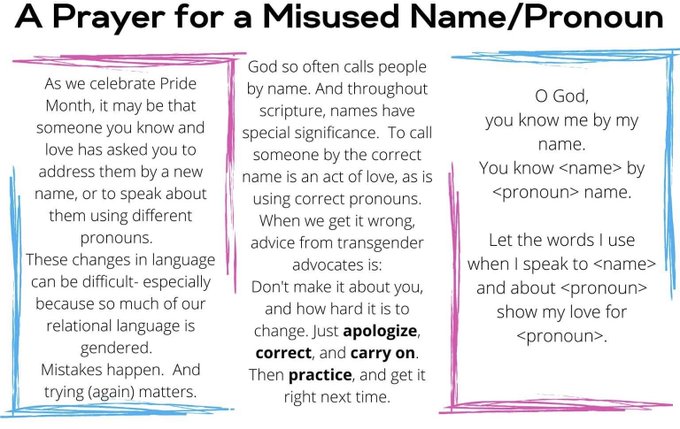
Image description: As we celebrate Pride Month, it may be that someone you know and love has asked you to address them by a new name, or to speak about them using different pronouns. These changes in language can be difficult–especially because so much of our relational language is gendered. Mistakes happen. And trying (again) matters. God so often calls people by name. And throughout scripture, names have special significance. To call someone by the correct name is an act of love, as is using correct pronouns. When we get it wrong, advice from transgender advocates is: Don’t make it about you and how hard it is to change. Just apologize, correct, and carry on. Then practice, and get it right next time.

O God,

You know me by my name.

You know <name> by <pronoun> name.

Let the words I use when I speak to <name> and about <pronoun> show my love for <pronoun>.